<?xml version="1.0" encoding="utf-8"?><feed xmlns="http://www.w3.org/2005/Atom" ><generator uri="https://jekyllrb.com/" version="3.10.0">Jekyll</generator><link href="http://jmieses.com/feed.xml" rel="self" type="application/atom+xml" /><link href="http://jmieses.com/" rel="alternate" type="text/html" /><updated>2026-04-19T02:44:47+00:00</updated><id>http://jmieses.com/feed.xml</id><title type="html">Johnny Mieses</title><subtitle>Portfolio</subtitle><author><name>Johnny Mieses</name></author><entry><title type="html">Test Post JavaScript</title><link href="http://jmieses.com/Test-Post-JavaScript/" rel="alternate" type="text/html" title="Test Post JavaScript" /><published>2020-06-29T00:00:00+00:00</published><updated>2020-06-29T00:00:00+00:00</updated><id>http://jmieses.com/Test-Post-JavaScript</id><content type="html" xml:base="http://jmieses.com/Test-Post-JavaScript/"><![CDATA[<p>Testing Post for JavaScript</p>

<svg id="mysvg" style="display:block; width:70%; height:20em; margin:0em auto; border:0.07em solid #808080"></svg>
<p><label for="degree">Degree:</label>
<input type="number" id="degree" name="degree" step="1" value="5" min="3" /></p>

<script>
var svg = document.querySelector('#mysvg');
var degree = document.getElementById("degree").value;

//dimension of svg
var svgRect = svg.getBoundingClientRect();
var svgw = svgRect.width;
var svgh = svgRect.height;

//center point of svg
var xcenter = svgw/2;
var ycenter = svgh/2;
var ctrlPts = [];
var rayCount = 20;

function randn_bm() {
    let u = 0, v = 0;
    while(u === 0) u = Math.random(); //Converting [0,1) to (0,1)
    while(v === 0) v = Math.random();
    let num = Math.sqrt( -2.0 * Math.log( u ) ) * Math.cos( 2.0 * Math.PI * v );
    //num = num / 10.0 + 0.5; // Translate to 0 -> 1
    if (num > 1 || num < 0) return randn_bm(); // resample between 0 and 1
    return num;
}

//http://stackoverflow.com/a/3642265/1869660
function makeSVGElement(tag, attrs) {
    var el= document.createElementNS('http://www.w3.org/2000/svg', tag);
    for (var k in attrs) {
        el.setAttribute(k, attrs[k]);
    }
    return el;
}

function rnPoints(){
	while(svg.firstChild != null)
    	svg.removeChild(svg.firstChild);
    degree = document.getElementById("degree").value;
	for(var i = 0; i < degree; i++){
    	var svgx = svgw * randn_bm();
        var svgy = svgh * randn_bm();
        ctrlPts.push({x : svgx, y : svgy});
		var circle = makeSVGElement('circle', { cx: ctrlPts[i].x,
                                        cy: ctrlPts[i].y,
                                        r: 5,
                                        stroke: 'red',
                                       'stroke-width': 2,
                                        fill: 'orange' });	
		svg.appendChild(circle);
	}
   
 // stop random point generation   
 //    if(count < 20){	
 //    	count = count + 1;
	// }else{
	// 	clearInterval(setIntervalID);
	// }
}

var count = 1;
var setIntervalID = setInterval(deCasteljau, 5000);

function deCasteljau(){
	rnPoints();
 	var cpyCtrlPts = ctrlPts;
    var n = cpyCtrlPts.length;
    for(var u = 0.0; u <= 1.0; u += 0.001){ 
        for(var i = 1; i < n; i++){
            for(var j = 0; j < n - i; j++){
                cpyCtrlPts[j].x = (1.0-u) * cpyCtrlPts[j].x + u * cpyCtrlPts[j + 1].x
                cpyCtrlPts[j].y = (1.0-u) * cpyCtrlPts[j].y + u * cpyCtrlPts[j + 1].y
            }
        }
       var circle = makeSVGElement('circle', { cx: cpyCtrlPts[0].x,
                                        cy: cpyCtrlPts[0].y,
                                        r: 1,
                                        stroke: 'black',
                                       'stroke-width': 2,
                                        fill: 'orange' });	
	   svg.appendChild(circle);
    }
    ctrlPts = [];

}

// I really enjoy working with curves since they give a lot of room for playing around 
// from a programming and mathematical perspective. The curve can be controlled by playing
// around with several variables which give a higher level of understanding on how this
// structure works.
</script>]]></content><author><name>Johnny Mieses</name></author><summary type="html"><![CDATA[Testing, JS]]></summary></entry><entry><title type="html">Displaying Random Points from Normal Distribution with OpenGL</title><link href="http://jmieses.com/Random-Points-From-Normal-Distribution-In-OpenGL/" rel="alternate" type="text/html" title="Displaying Random Points from Normal Distribution with OpenGL" /><published>2020-04-24T00:00:00+00:00</published><updated>2020-04-24T00:00:00+00:00</updated><id>http://jmieses.com/Random-Points-From-Normal-Distribution-In-OpenGL</id><content type="html" xml:base="http://jmieses.com/Random-Points-From-Normal-Distribution-In-OpenGL/"><![CDATA[<h2 id="creating-a-normal-distribution">Creating a Normal Distribution</h2>

<p>I will be using a pseudorandom generated set of points that can serve to test multiple algorithms that use points in their processing step. In particular, we can use a normal distribution to generate those points. Specifically, 2D points for our 2D OpenGL baseline. In addition,  I’d prefer that the geometries created from these points fall more or less within the center of our OpenGL window. For this , I will be using a sigmoid function to map the domain $(-\infty, \infty)$ from the normal distribution to the range (-1, 1). This is the needed range since OpenGL processes our 2D coordinates in the range (-1, 1) and then transforms that to window coordinates in the range (SCREEN_WIDTH, SCREEN_HEIGHT).</p>

<p>We can get a set of pseudorandom points using the template class std::normal_distribution from STL. Starting from an uniform random generator to get a mean and a standard deviation value, which serve as arguments for the std::normal_distribution constructor. After that we simply need to obtain the sample value that is returned from the std::normal_distribution object, and apply the sigmoid function for the mapping.</p>

<h2 id="implementation">Implementation</h2>

<p>At first, I decided to use the follwing sigmoid function $f(x) =  \frac{e^{2x} - 1}{e^{2x} + 1}$.
But, I wanted to avoid the use of exponents. Instead, I used the following sigmoid function for the
actual implementation</p>

\[f(x) = \frac{x}{1+ \lvert x \rvert}\]

<p>This allow for an easy and fast calculation along with the mapping in the necessary range. Thus, 
this sigmoid function does the mapping $f(x) : (-\infty, \infty) \to (-1, 1)$.</p>

<div class="language-c++ highlighter-rouge"><div class="highlight"><pre class="highlight"><code><span class="kt">void</span> <span class="nf">Normal_Distribution</span><span class="p">(</span><span class="kt">float</span> <span class="o">*</span> <span class="n">sample</span><span class="p">)</span> <span class="p">{</span>

    <span class="k">static</span> <span class="n">std</span><span class="o">::</span><span class="n">random_device</span> <span class="n">rd</span><span class="p">;</span>
    <span class="k">static</span> <span class="n">std</span><span class="o">::</span><span class="n">mt19937</span> <span class="n">gen</span><span class="p">(</span><span class="n">rd</span><span class="p">());</span>                                         <span class="c1">// Mersenne twister PRNG</span>
    <span class="k">static</span> <span class="n">std</span><span class="o">::</span><span class="n">default_random_engine</span> <span class="n">generator</span><span class="p">;</span>
    <span class="k">static</span> <span class="n">std</span><span class="o">::</span><span class="n">uniform_real_distribution</span><span class="o">&lt;</span><span class="kt">double</span><span class="o">&gt;</span> <span class="n">distribution</span><span class="p">(</span><span class="mf">0.0</span><span class="p">,</span> <span class="mf">1.0</span><span class="p">);</span>

    <span class="k">static</span> <span class="k">const</span> <span class="kt">float</span> <span class="n">mean</span> <span class="o">=</span> <span class="n">distribution</span><span class="p">(</span><span class="n">generator</span><span class="p">);</span>
    <span class="k">static</span> <span class="k">const</span> <span class="kt">float</span> <span class="n">std_dev</span> <span class="o">=</span> <span class="n">distribution</span><span class="p">(</span><span class="n">generator</span><span class="p">);</span>
                                            
    <span class="k">static</span> <span class="n">std</span><span class="o">::</span><span class="n">normal_distribution</span><span class="o">&lt;</span><span class="kt">float</span><span class="o">&gt;</span> <span class="n">normal_distribution</span><span class="p">(</span><span class="n">mean</span><span class="p">,</span> <span class="n">std_dev</span><span class="p">);</span> <span class="c1">// instance of class std::normal_distribution with specific mean and stddev</span>

    <span class="kt">float</span> <span class="n">x</span> <span class="o">=</span> <span class="n">normal_distribution</span><span class="p">(</span><span class="n">gen</span><span class="p">);</span>
    <span class="o">*</span><span class="n">sample</span> <span class="o">=</span> <span class="n">x</span> <span class="o">/</span> <span class="p">(</span><span class="mi">1</span> <span class="o">+</span> <span class="n">std</span><span class="o">::</span><span class="n">abs</span><span class="p">(</span><span class="n">x</span><span class="p">));</span> <span class="c1">// *sample in range (-1, 1) using sigmoid function</span>
<span class="p">}</span>
</code></pre></div></div>
<p>Find source code in my github repository for the project <a href="https://github.com/jmieses/opengl_2D_gui">opengl_2D_baseline</a></p>
<div class="embed-container">
  <iframe src="https://www.youtube.com/embed/tyNU6R2jDvA" width="300" height="240" frameborder="0" allowfullscreen="">
  </iframe>
</div>]]></content><author><name>Johnny Mieses</name></author><summary type="html"><![CDATA[OpenGL, Randomness, Normal Distribution]]></summary></entry><entry><title type="html">Swapping Nibbles in a 64-bit Bitfield</title><link href="http://jmieses.com/Swapping-Nibbles-in-64-bitfield/" rel="alternate" type="text/html" title="Swapping Nibbles in a 64-bit Bitfield" /><published>2020-04-24T00:00:00+00:00</published><updated>2020-04-24T00:00:00+00:00</updated><id>http://jmieses.com/Swapping-Nibbles-in-64-bitfield</id><content type="html" xml:base="http://jmieses.com/Swapping-Nibbles-in-64-bitfield/"><![CDATA[<h2 id="the-bitfield-problem">The Bitfield Problem</h2>

<p>A bitfield defined in big endian platform can present a problem in a little endian based platform. Indeed, for big endian the Most Significant Bit (MSB) would be a the top of the bitfield, while it would be the Least Significant Bit (LSB) for little endian. A quick and dirty solution would be to start using a swapping function where needed to change endianess accordingly. Of course, it would be advisible to change the bitfield itself to the prefer endianess, like for example <a href="http://lxr.linux.no/linux+v2.6.38/include/linux/ip.h">this compiler switch in linux kernel</a>. But for the sake of explanation let’s suppose it is not possible to change the bitfield structure.</p>

<p>In addition, let’s suppose that we need to keep the nibbles in a specific ordered sequence. In other words, the order of the nibble sequence determines the validity of the information. This case would be true for an API expecting a sequence of flags from a bitfield in which each flag is one bit. The flags are expected in specific order, where the MSB comes first.</p>

<h2 id="how-it-works">How It Works</h2>

<p>By taking the value and dividing it in half, we can move the front to the back half, and the back half to the front half. We achieve this by first clearing the halfs that we want</p>

\[\frac{\qquad \texttt{0123456789ABCDEF} \\ \&amp; \quad \texttt{00000000FFFFFFFF}}{\qquad \texttt{0000000089ABCDEF}} \hspace{3em} 
\frac{\qquad \texttt{0123456789ABCDEF} \\ \&amp; \quad \texttt{FFFFFFFF00000000}}{\qquad \texttt{0123456700000000}}\]

<p>Consequently, we can move each half to it’s expected place. This is achieve using the right and left shift operator moving the bit sequence by 32 bits in each direction.</p>

\[\hspace{3em} \texttt{(0000000089ABCDEF &lt;&lt; 32) = 89ABCDEF00000000} \\
\hspace{3em} \texttt{(0123456700000000 &gt;&gt; 32) = 0000000001234567}\]

<p>Then, it is just a matter of using the OR operator to get complete the swapped value.</p>

\[\frac{\quad \texttt{89ABCDEF00000000} \\ | \quad \texttt{0000000001234567}}{\quad \texttt{89ABCDEF01234567}}\]

<p>Finally, repeat this recipe for the next 2 bytes, 1 byte, and the nibbles. That will reverse the order sequence of the byte list based on the nibbles.</p>

<div class="language-c highlighter-rouge"><div class="highlight"><pre class="highlight"><code><span class="k">typedef</span> <span class="kt">unsigned</span> <span class="kt">long</span> <span class="kt">long</span> <span class="n">uint64</span><span class="p">;</span>

<span class="kt">void</span> <span class="nf">Swap_Nibbles_64Bit</span><span class="p">(</span><span class="n">uint64</span><span class="o">&amp;</span> <span class="n">val</span><span class="p">)</span> <span class="p">{</span>
    <span class="n">val</span> <span class="o">=</span> <span class="p">(</span><span class="n">val</span> <span class="o">&amp;</span> <span class="mh">0x00000000FFFFFFFF</span><span class="p">)</span> <span class="o">&lt;&lt;</span> <span class="mi">32</span> <span class="o">|</span> <span class="p">(</span><span class="n">val</span> <span class="o">&amp;</span> <span class="mh">0xFFFFFFFF00000000</span><span class="p">)</span> <span class="o">&gt;&gt;</span> <span class="mi">32</span><span class="p">;</span> <span class="c1">// remove line for 32-bit swap</span>
    <span class="n">val</span> <span class="o">=</span> <span class="p">(</span><span class="n">val</span> <span class="o">&amp;</span> <span class="mh">0x0000FFFF0000FFFF</span><span class="p">)</span> <span class="o">&lt;&lt;</span> <span class="mi">16</span> <span class="o">|</span> <span class="p">(</span><span class="n">val</span> <span class="o">&amp;</span> <span class="mh">0xFFFF0000FFFF0000</span><span class="p">)</span> <span class="o">&gt;&gt;</span> <span class="mi">16</span><span class="p">;</span>
    <span class="n">val</span> <span class="o">=</span> <span class="p">(</span><span class="n">val</span> <span class="o">&amp;</span> <span class="mh">0x00FF00FF00FF00FF</span><span class="p">)</span> <span class="o">&lt;&lt;</span> <span class="mi">8</span>  <span class="o">|</span> <span class="p">(</span><span class="n">val</span> <span class="o">&amp;</span> <span class="mh">0xFF00FF00FF00FF00</span><span class="p">)</span> <span class="o">&gt;&gt;</span> <span class="mi">8</span><span class="p">;</span>
    <span class="n">val</span> <span class="o">=</span> <span class="p">(</span><span class="n">val</span> <span class="o">&amp;</span> <span class="mh">0x0F0F0F0F0F0F0F0F</span><span class="p">)</span> <span class="o">&lt;&lt;</span> <span class="mi">4</span>  <span class="o">|</span> <span class="p">(</span><span class="n">val</span> <span class="o">&amp;</span> <span class="mh">0xF0F0F0F0F0F0F0F0</span><span class="p">)</span> <span class="o">&gt;&gt;</span> <span class="mi">4</span><span class="p">;</span>	<span class="c1">// remove line for byte swap</span>
<span class="p">}</span>
</code></pre></div></div>

<p>A nice thing about this function, is that by removing the last or the first line, we can make a 32-bit swap and a byte swapp respectively.</p>]]></content><author><name>Johnny Mieses</name></author><summary type="html"><![CDATA[Embedded, Endianess]]></summary></entry><entry><title type="html">Bezier Curve with deCasteljau Algorithm</title><link href="http://jmieses.com/deCasteljauAlgorithm/" rel="alternate" type="text/html" title="Bezier Curve with deCasteljau Algorithm" /><published>2020-04-04T00:00:00+00:00</published><updated>2020-04-04T00:00:00+00:00</updated><id>http://jmieses.com/deCasteljauAlgorithm</id><content type="html" xml:base="http://jmieses.com/deCasteljauAlgorithm/"><![CDATA[<svg id="mysvg" style="display:block; width:70%; height:20em; margin:0em auto; border:0.07em solid #808080"></svg>
<p><label for="degree">Degree:</label>
<input type="number" id="degree" name="degree" step="1" value="5" min="3" /></p>

<script>
var svg = document.querySelector('#mysvg');
var degree = document.getElementById("degree").value;

//dimension of svg
var svgRect = svg.getBoundingClientRect();
var svgw = svgRect.width;
var svgh = svgRect.height;

//center point of svg
var xcenter = svgw/2;
var ycenter = svgh/2;
var ctrlPts = [];
var rayCount = 20;

function randn_bm() {
    let u = 0, v = 0;
    while(u === 0) u = Math.random(); //Converting [0,1) to (0,1)
    while(v === 0) v = Math.random();
    let num = Math.sqrt( -2.0 * Math.log( u ) ) * Math.cos( 2.0 * Math.PI * v );
    //num = num / 10.0 + 0.5; // Translate to 0 -> 1
    if (num > 1 || num < 0) return randn_bm(); // resample between 0 and 1
    return num;
}

//http://stackoverflow.com/a/3642265/1869660
function makeSVGElement(tag, attrs) {
    var el= document.createElementNS('http://www.w3.org/2000/svg', tag);
    for (var k in attrs) {
        el.setAttribute(k, attrs[k]);
    }
    return el;
}

function rnPoints(){
    while(svg.firstChild != null)
        svg.removeChild(svg.firstChild);
    degree = document.getElementById("degree").value;
    for(var i = 0; i < degree; i++){
        var svgx = svgw * randn_bm();
        var svgy = svgh * randn_bm();
        ctrlPts.push({x : svgx, y : svgy});
        var circle = makeSVGElement('circle', { cx: ctrlPts[i].x,
                                        cy: ctrlPts[i].y,
                                        r: 5,
                                        stroke: 'red',
                                       'stroke-width': 2,
                                        fill: 'orange' });  
        svg.appendChild(circle);
    }
   
 // stop random point generation   
 //    if(count < 20){  
 //     count = count + 1;
    // }else{
    //  clearInterval(setIntervalID);
    // }
}

var count = 1;
var setIntervalID = setInterval(deCasteljau, 5000);

function deCasteljau(){
    rnPoints();
    var cpyCtrlPts = ctrlPts;
    var n = cpyCtrlPts.length;
    for(var u = 0.0; u <= 1.0; u += 0.001){ 
        for(var i = 1; i < n; i++){
            for(var j = 0; j < n - i; j++){
                cpyCtrlPts[j].x = (1.0-u) * cpyCtrlPts[j].x + u * cpyCtrlPts[j + 1].x
                cpyCtrlPts[j].y = (1.0-u) * cpyCtrlPts[j].y + u * cpyCtrlPts[j + 1].y
            }
        }
       var circle = makeSVGElement('circle', { cx: cpyCtrlPts[0].x,
                                        cy: cpyCtrlPts[0].y,
                                        r: 1,
                                        stroke: 'black',
                                       'stroke-width': 2,
                                        fill: 'orange' });  
       svg.appendChild(circle);
    }
    ctrlPts = [];

}

// I really enjoy working with curves since they give a lot of room for playing around 
// from a programming and mathematical perspective. The curve can be controlled by playing
// around with several variables which give a higher level of understanding on how this
// structure works.
</script>

<h2 id="introduction">Introduction</h2>

<p>The deCasteljau’s algorithm introduces a way to create Bezier curves through the evaluation of Bernstein polynomials. A Bezier curve 
is a parametric polynomial curve that uses polynomials for its coordinates functions [1]. Consequently, an nth-degree Bezier curve is defined by</p>

\[\textbf{C}(u) = \sum^n_{i=0}B_{i,n}(u)\textbf{P}_{i} \qquad  0 \leq u \leq 1.\]

<p>The set $\{\textbf{P}\}$ are called control points, and the $B_{i,n}(u)$ are Bernstein polynomials.
The control points are the geometric coefficients of the Bezier curve and the Bernstein polynomials are basis functions. Therefore, 
the curve $\textbf{C(u)}$ can be expressed as a linear combination of the control points and Bernstein polynomials. Consequently, 
the deCasteljau’s algorithm recursively iterates over the control points to produce a numerical stable Bezier curve.</p>

<p>Bernstein polynomials gives a formulation for building Bezier curves of any degree. The Bernstein polynomials $B_{i,n}$ are defined as</p>

<p>\begin{equation}
B_{i,n}(u) = \frac{n!}{i!(n-i)!}u^i(1-u)^{n-i} \qquad 0 \leq u \leq 1.
\end{equation}</p>

<p>However, the deCasteljau’s algorithm avoids the direct calculation of factorials. Instead, it exploits the Bernstein polynomials property where
$B_{0,n}(0) = B_{n,n}(1) = 1$, and it produces a point on the curve by recursion. In addition, the partition of unity property $ \sum^n_{i=0}B_{i,n}(u) = 1 
\quad \forall u \in [0,1]$ 
ensures the interpolation between the control points.</p>

<h2 id="example">Example</h2>

<p>For this example, let’s create a quadratic Bezier curve. A quadratic Bezier curve represents the case for $n = 2$ in the definition above. Using the property
$B_{0,n}(0) = B_{n,n}(1) = 1$ the Bernstein polynomials take the following form</p>

\[B_{0,1}(u) = (1-u)B_{0,0}(u) + uB_{-1,0}(u) = 1 - u \\
B_{0,1}(u) = (1-u)B_{1,0}(u) + uB_{0,0}(u) = u \\
B_{0,1}(u) = (1-u)B_{0,1}(u) + uB_{-1,0}(u) = (1 - u)^2 \\
B_{0,1}(u) = (1-u)B_{0,0}(u) + uB_{-1,0}(u) = (1 - u)u + u(1-u) = 2u(1 - u) \\
B_{0,1}(u) = (1-u)B_{2,1}(u) + uB_{1,1}(u) = 1 - u\]

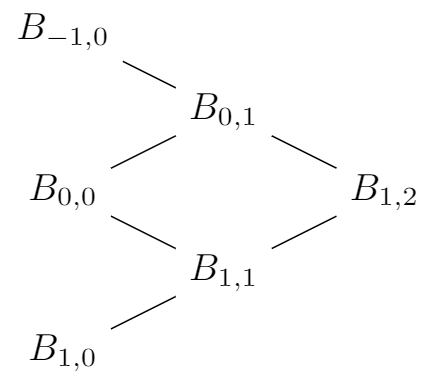
<p>This a direct result of using the recursive property of the basis functions. In addition, from the figure below shows the set of recursive dependency for the of 
$B_{1,2}$</p>

<p><img src="http://jmieses.com/assets/images/bernstein-tree.PNG" alt="image-center" class="align-center" /></p>

<p>Then the curve formed by control points $\{ \textbf{P}_0, \textbf{P}_1, \textbf{P}_2 \}$ is</p>

\[\textbf{C(u)} = B_{0,2}P_0 + B_{1,2}P_1 + B_{2,2}P_2 
= (1-u)^2P_0 + 2u(1-u)P_1 + u^2P_2\]

<h2 id="implementation">Implementation</h2>

<h3 id="opengl-setup">OpenGL Setup</h3>

<p>For drawing the curve I will be using modern OpenGL; the setup will use vertex and fragment shaders. I followed this <a href="https://learnopengl.com/">tutorial</a> for the basic setup. 
In addition, the data will be computed with the CPU, then with pass this data to OpenGL drawing functions for the GPU to draw it.</p>

<p>For the implementation, the algorithm will be encapsulated in a class. A curve class will contain the algorithm, so we could reuse it and implement other algorithms for curve
creation.</p>

<h3 id="decasteljau-algorithm">deCasteljau Algorithm</h3>

<p>We would like to display a 2D curve, therefore, having a struct with an x and y coordinates will come very handy. By defining a struct Point with two coordinates we can create a vector of points, which can then be used for the algorithm. Thus, it just makes sense to create a vector that holds a collection of 2D points for the control points. In addition, we will use the same data structure to copy the control points in a temporary vector of points, which will produce the points for the Bezier curve.</p>

<div class="language-c++ highlighter-rouge"><div class="highlight"><pre class="highlight"><code><span class="cp">#ifndef CURVE_H
#define CURVE_H
</span>
<span class="cp">#include</span> <span class="cpf">&lt;vector&gt;</span><span class="cp">
</span><span class="k">struct</span> <span class="nc">Point</span> <span class="p">{</span>
    <span class="kt">float</span> <span class="n">x</span><span class="p">;</span>
    <span class="kt">float</span> <span class="n">y</span><span class="p">;</span>
<span class="p">};</span>

<span class="k">class</span> <span class="nc">Curve</span><span class="p">{</span>
<span class="nl">public:</span>
    <span class="n">Curve</span><span class="p">()</span> <span class="o">=</span> <span class="k">default</span><span class="p">;</span>
    <span class="k">const</span> <span class="n">std</span><span class="o">::</span><span class="n">vector</span><span class="o">&lt;</span><span class="kt">float</span><span class="o">&gt;&amp;</span> <span class="n">deCasteljau</span><span class="p">(</span><span class="n">std</span><span class="o">::</span><span class="n">vector</span><span class="o">&lt;</span><span class="kt">float</span><span class="o">&gt;&amp;</span> <span class="n">ctrl_pts</span><span class="p">);</span>
<span class="nl">private:</span>
    <span class="kt">void</span> <span class="n">deCasteljau_Subroutine</span><span class="p">(</span><span class="kt">float</span> <span class="n">u</span><span class="p">);</span>
    <span class="kt">void</span> <span class="n">Vector_To_Points</span><span class="p">(</span><span class="n">std</span><span class="o">::</span><span class="n">vector</span><span class="o">&lt;</span><span class="kt">float</span><span class="o">&gt;&amp;</span> <span class="n">ctrl_pts</span><span class="p">);</span>
    <span class="n">std</span><span class="o">::</span><span class="n">vector</span><span class="o">&lt;</span><span class="kt">float</span><span class="o">&gt;</span> <span class="n">m_curve</span><span class="p">;</span>
    <span class="n">std</span><span class="o">::</span><span class="n">vector</span><span class="o">&lt;</span><span class="n">Point</span><span class="o">&gt;</span> <span class="n">m_ctrl_pts</span><span class="p">;</span>
<span class="p">};</span>
<span class="cp">#endif
</span></code></pre></div></div>

<div class="language-c++ highlighter-rouge"><div class="highlight"><pre class="highlight"><code><span class="k">static</span> <span class="k">const</span> <span class="kt">float</span> <span class="n">m_res</span> <span class="o">=</span> <span class="mf">0.001</span><span class="n">f</span><span class="p">;</span>

<span class="k">const</span> <span class="n">std</span><span class="o">::</span><span class="n">vector</span><span class="o">&lt;</span><span class="kt">float</span><span class="o">&gt;&amp;</span> <span class="n">Curve</span><span class="o">::</span><span class="n">deCasteljau</span><span class="p">(</span><span class="n">std</span><span class="o">::</span><span class="n">vector</span><span class="o">&lt;</span><span class="kt">float</span><span class="o">&gt;&amp;</span> <span class="n">ctrl_pts</span><span class="p">){</span>
    <span class="n">Vector_To_Points</span><span class="p">(</span><span class="n">ctrl_pts</span><span class="p">);</span>

    <span class="k">if</span><span class="p">(</span><span class="o">!</span><span class="n">m_curve</span><span class="p">.</span><span class="n">empty</span><span class="p">())</span> <span class="n">m_curve</span><span class="p">.</span><span class="n">clear</span><span class="p">();</span>

    <span class="k">for</span><span class="p">(</span><span class="kt">float</span> <span class="n">u</span> <span class="o">=</span> <span class="mf">0.0</span><span class="n">f</span><span class="p">;</span> <span class="n">u</span> <span class="o">&lt;</span> <span class="mf">1.0</span><span class="n">f</span><span class="p">;</span> <span class="n">u</span> <span class="o">+=</span> <span class="n">m_res</span><span class="p">){</span>
        <span class="n">deCasteljau_Subroutine</span><span class="p">(</span><span class="n">u</span><span class="p">);</span>
    <span class="p">}</span>

    <span class="k">return</span> <span class="n">m_curve</span><span class="p">;</span>
<span class="p">}</span>

<span class="kt">void</span> <span class="n">Curve</span><span class="o">::</span><span class="n">deCasteljau_Subroutine</span><span class="p">(</span><span class="kt">float</span> <span class="n">u</span><span class="p">){</span>
    <span class="n">std</span><span class="o">::</span><span class="n">vector</span><span class="o">&lt;</span><span class="n">Point</span><span class="o">&gt;</span> <span class="n">tmp_ctrl_pts</span><span class="p">(</span><span class="n">m_ctrl_pts</span><span class="p">);</span>
    <span class="k">for</span><span class="p">(</span><span class="kt">int</span> <span class="n">i</span> <span class="o">=</span> <span class="mi">1</span><span class="p">;</span> <span class="n">i</span> <span class="o">&lt;</span> <span class="n">tmp_ctrl_pts</span><span class="p">.</span><span class="n">size</span><span class="p">();</span> <span class="n">i</span><span class="o">++</span><span class="p">){</span>
        <span class="k">for</span><span class="p">(</span><span class="kt">int</span> <span class="n">j</span> <span class="o">=</span> <span class="mi">0</span><span class="p">;</span> <span class="n">j</span> <span class="o">&lt;</span> <span class="n">tmp_ctrl_pts</span><span class="p">.</span><span class="n">size</span><span class="p">()</span> <span class="o">-</span> <span class="n">i</span><span class="p">;</span> <span class="n">j</span><span class="o">++</span><span class="p">){</span>
            <span class="n">tmp_ctrl_pts</span><span class="p">[</span><span class="n">j</span><span class="p">].</span><span class="n">x</span> <span class="o">=</span> <span class="p">(</span><span class="mf">1.0</span><span class="n">f</span> <span class="o">-</span> <span class="n">u</span><span class="p">)</span> <span class="o">*</span> <span class="n">tmp_ctrl_pts</span><span class="p">[</span><span class="n">j</span><span class="p">].</span><span class="n">x</span> <span class="o">+</span> <span class="n">u</span> <span class="o">*</span> <span class="p">(</span><span class="n">tmp_ctrl_pts</span><span class="p">[</span><span class="n">j</span> <span class="o">+</span> <span class="mi">1</span><span class="p">].</span><span class="n">x</span><span class="p">);</span>
            <span class="n">tmp_ctrl_pts</span><span class="p">[</span><span class="n">j</span><span class="p">].</span><span class="n">y</span> <span class="o">=</span> <span class="p">(</span><span class="mf">1.0</span><span class="n">f</span> <span class="o">-</span> <span class="n">u</span><span class="p">)</span> <span class="o">*</span> <span class="n">tmp_ctrl_pts</span><span class="p">[</span><span class="n">j</span><span class="p">].</span><span class="n">y</span> <span class="o">+</span> <span class="n">u</span> <span class="o">*</span> <span class="p">(</span><span class="n">tmp_ctrl_pts</span><span class="p">[</span><span class="n">j</span> <span class="o">+</span> <span class="mi">1</span><span class="p">].</span><span class="n">y</span><span class="p">);</span>
        <span class="p">}</span>
    <span class="p">}</span>

    <span class="n">m_curve</span><span class="p">.</span><span class="n">emplace_back</span><span class="p">(</span><span class="n">tmp_ctrl_pts</span><span class="p">[</span><span class="mi">0</span><span class="p">].</span><span class="n">x</span><span class="p">);</span>
    <span class="n">m_curve</span><span class="p">.</span><span class="n">emplace_back</span><span class="p">(</span><span class="n">tmp_ctrl_pts</span><span class="p">[</span><span class="mi">0</span><span class="p">].</span><span class="n">y</span><span class="p">);</span>
    <span class="n">m_curve</span><span class="p">.</span><span class="n">emplace_back</span><span class="p">(</span><span class="mf">0.0</span><span class="n">f</span><span class="p">);</span>             <span class="c1">// the curve lives in the xy plane (x, y, z = 0)</span>
<span class="p">}</span>
</code></pre></div></div>

<p>The code for the project can be found <a href="https://github.com/jmieses/opengl_2D_gui">here</a>.</p>

<div class="embed-container">
  <iframe src="https://www.youtube.com/embed/vP-Ym-iZiiU" width="300" height="240" frameborder="0" allowfullscreen="">
  </iframe>
</div>

<h2 id="references">References</h2>
<p>[1]<a href="https://en.wikipedia.org/wiki/B%C3%A9zier_curve">https://en.wikipedia.org/wiki/B%C3%A9zier_curve</a></p>]]></content><author><name>Johnny Mieses</name></author><summary type="html"><![CDATA[OpenGL, deCasteljau, Algorithm]]></summary></entry></feed>